How to Use lzc-cli in Windows WSL
- Close the LCMD MicroServer client in Windows
DNS Resolution Issue
When the Windows native client starts, it uses the powershell AddDnsClientNrptRule command to forward all heiyu.space related domains to the client's internal IP. Early version clients didn't perform cleanup work, so after closing the Windows client and starting the WSL client, and since WSL uses the default DNS service, it cannot properly resolve heiyu.space related domains.
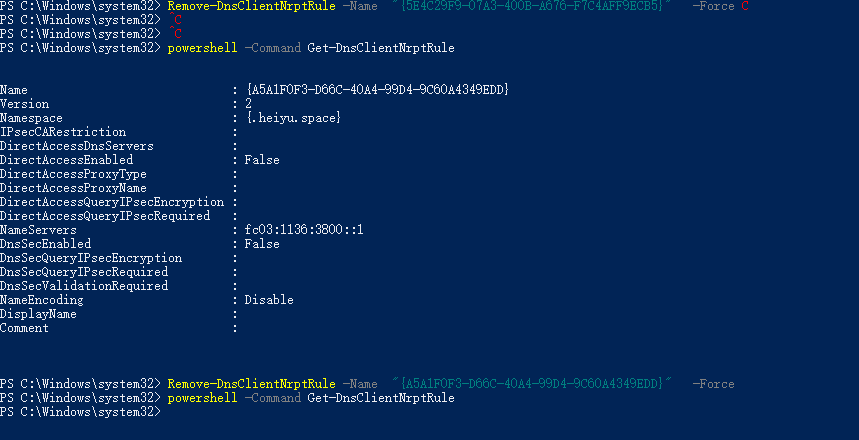
Manual cleanup is required (Newer versions of Windows clients will perform automatic cleanup when closing)
- View related rules
powershell -Command Get-DnsClientNrptRule - Delete related rules
Remove-DnsClientNrptRule -Name "Fill in the heiyu.space related Name UUID here" -Force
- Install the LCMD MicroServer Linux client in WSL (I'm using Ubuntu as an example here)
sudo apt install zenity zstd
sudo apt install libnss3-dev libgdk-pixbuf2.0-dev libgtk-3-dev libxss-dev

/bin/bash -c "$(curl -fsSL https://dl.lazycat.cloud/client/desktop/linux-install)"- Start the LCMD MicroServer client
~/.local/share/lzc-client-desktop/lzc-client-desktopEnter device name and password to log into the LCMD MicroServer device
Install nodejs (I'm using nvm here) and lzc-cli
curl -o- https://raw.githubusercontent.com/nvm-sh/nvm/v0.40.1/install.sh | bash

echo 'export NVM_DIR="$([ -z "${XDG_CONFIG_HOME-}" ] && printf %s "${HOME}/.nvm" || printf %s "${XDG_CONFIG_HOME}/nvm")"' >> ~/.bashrc
echo '[ -s "$NVM_DIR/nvm.sh" ] && \. "$NVM_DIR/nvm.sh" # This loads nvm' >> ~/.bashrc

nvm install v20
nvm use v20
npm install -g lzc-cli- Use lzc-cli to build lpk applications and install lpk
lzc-cli project build
lzc-cli lpk install cloud.lazycat.app.demo-v0.0.2.lpk- Have fun! For publishing lpk applications, you can check Publish Your First Application